For RE investors & wholesalers
Export Zillow search results to CSV in your browser
Turn a Zillow search into a spreadsheet you can actually work with. Paginate through results, pull agent and owner contacts on Pro, and keep everything in a panel on the same tab. Your listings stay on your machine until you download the CSV.
How it works
From search results to export in four steps. No copy-paste, no third-party dashboard, just the extension and your browser.
-
Add the extension
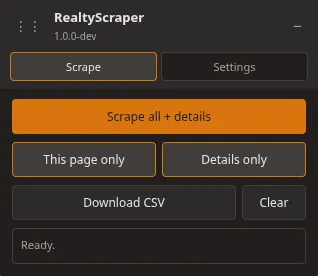
Install from the Chrome Web Store or Firefox Add-ons, open a for-sale search on Zillow, and the panel appears in the corner. You are ready to scrape in under a minute.
Free to install from official browser stores.
-
Collect listings
Scrape the page you're on or run Scrape all to gather the full result set. Pagination runs in the background so you can keep browsing or step away from the desk.
Free: 2 pages, 15 CSV columns Pro: 13 pages + detail contacts
-
Download CSV
Export address, price, beds, baths, property type, Zillow URL, and more into a file you can open in Excel or Google Sheets. It saves locally. We don't host your data.
15 columns on Free. 40 on Pro.
-
Go Pro!
When you need a real list-building tool, subscribe and paste your license key in the Settings tab. Pro adds full pagination, detail-page contacts, and the complete column set.
$10/mo. Cancel anytime. One browser per license.
Works where you already search
You already live on Zillow for comps and lead gen. RealtyScraper meets you there with Firefox and Chrome support. Install once and scrape from the same tab you use today.
Your search results never leave your browser until you choose to download. Our servers only handle account login and Pro license validation.
Free vs Pro
Start free and export real listings from your next Zillow search. Move to Pro when you are pulling full result sets, contact info, and every column we support.
Pro is $10/month. No annual plan at launch. Cancel from your account whenever.
Scrape the current search page Free: Included Pro: Included
Run a for-sale search on Zillow and scrape from the panel. You get the core fields investors care about: address, price, beds, baths, property type, and a direct link back to the listing. Free tier needs no account.
Pro uses the same starting point. The upgrade matters when one page of results is not enough, or when you need contact info and the full export schema.
Multi-page collection (Scrape all) Free: 2 pages Pro: 13 pages
Scrape all walks through Zillow pagination and rolls everything into one list. On Free, that stops at 2 pages so you can test the tool on your market before spending anything.
Pro takes you to about 13 pages, which is where Zillow usually caps a single search anyway. Collection runs in the tab while you do other work.
Detail-page contacts Free: Not included Pro: Included
Pro hits individual listing pages and pulls agent name, phone, broker, and owner contact fields when Zillow exposes them. That is the difference between a property list and a call list.
Free keeps the detail buttons off. You still export everything visible on the search results page. Contact columns come with Pro.
CSV export columns Free: 15 columns Pro: 40 columns
Free covers the essentials in 15 columns: zpid, address parts, price, beds, baths, sqft, property type, status, URL, and when you scraped it.
Pro fills out the picture with sold date, tax, zestimate, geo coordinates, broker metadata, FSBO flags, contact columns, and more for 40 fields total. The CSV downloads to your computer. We never see the file.
Privacy and your data Free: Same Pro: Same
Listing rows live in extension storage on your machine until you download or clear them. We do not upload your search results to RealtyScraper servers.
Free never has to talk to our API. Pro only checks your license key when you validate in Settings or refresh plan status. No listing payload goes with that request.
Pro license and billing Free: Not required Pro: $10/mo
Subscribe on realtyscraper.io, copy your license key from the account page, and paste it into the extension Settings tab. Pro activates right after validation. One license works on one browser at a time; unbind from your account before switching Firefox and Chrome.
Cancel from the account portal whenever you want. You keep Pro through the end of the paid period. Come back and resubscribe from checkout if you need it again.